
AI does not make processes or workshops better by magic. It makes good teams faster when it works inside a clear method. That is the idea behind the Data & AI Business Catalyst: a Miro AI Sidekick for our Data & AI Business Design method. It helps teams turn rough ideas into structured outcomes. Think of it as a catalyst in the literal sense: it accelerates the path from strategy design to solution delivery by minimizing the time invest.
0. Workshop Briefing
In a Data & AI workshop, teams rarely start with one clean question. They start with documents, stakeholder perspectives, business goals, risks, constraints, and early ideas. The team works in one collaborative Miro board that brings the briefing area, workshop canvases, descriptions, tutorials, examples, and AI-supported actions together in a single workflow.
First, the team adds its briefing documents to the board. Then the Catalyst help transform the documents into structured context for later AI actions.
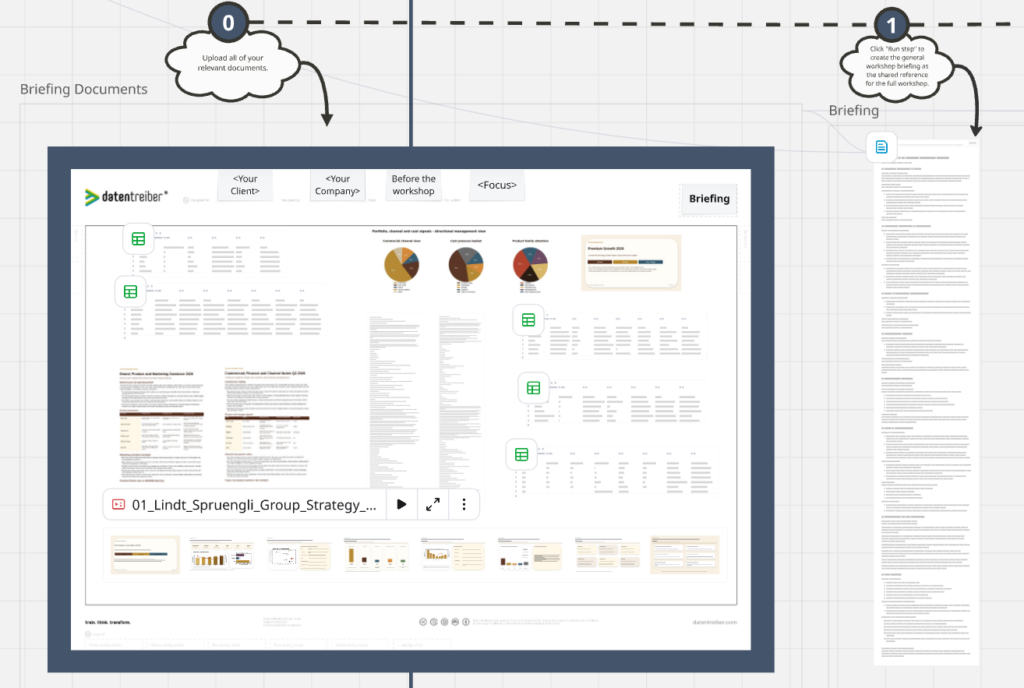
1. Start with the Action Buttons
The team now moves into the next steps of the Lean Data & AI Strategy Workshop template: Working directly on the canvas.
For this workflow, the Catalyst has 5 predefined actions: Consult, Create, Check, Challenge, and Choose. Those buttons will help you to structure your teams workflow for each canvas, by providing specially prepared prompts, which are aligned with our Data & AI Business Design method.
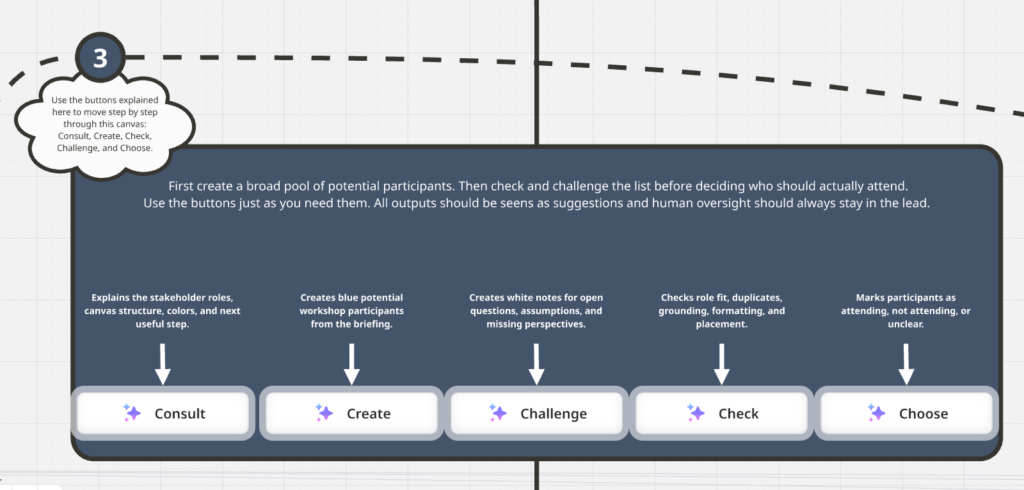
That integrates the Miro Sidekick directly into the workshop flow and strategy design process. All AI assistance happens directly here on the board, instead of scattering AI assistance accross tools or chatsbots. The canvases themselves are the context and build themselves throughout the workshop.
2. Consult the Canvas
With Consult, the Catalyst explains the canvas in the current workshop context: what the fields mean, how the briefing connects to the work, and why this step matters for Analytics & AI use-case ideation.
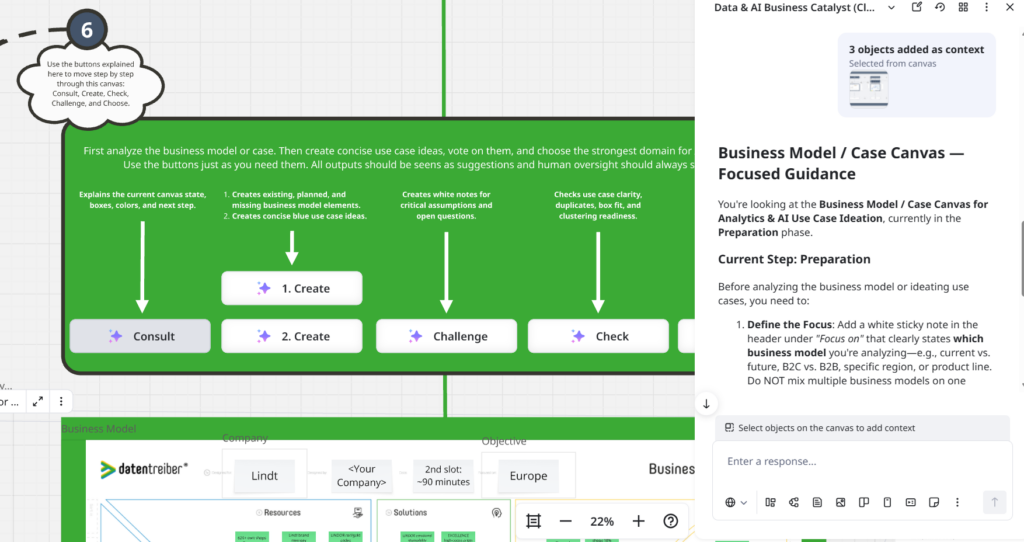
3. Create working material
With Create, the Catalyst turns context into first working material. It can generate sticky notes and mark them with tags that show where they belong on the canvas.
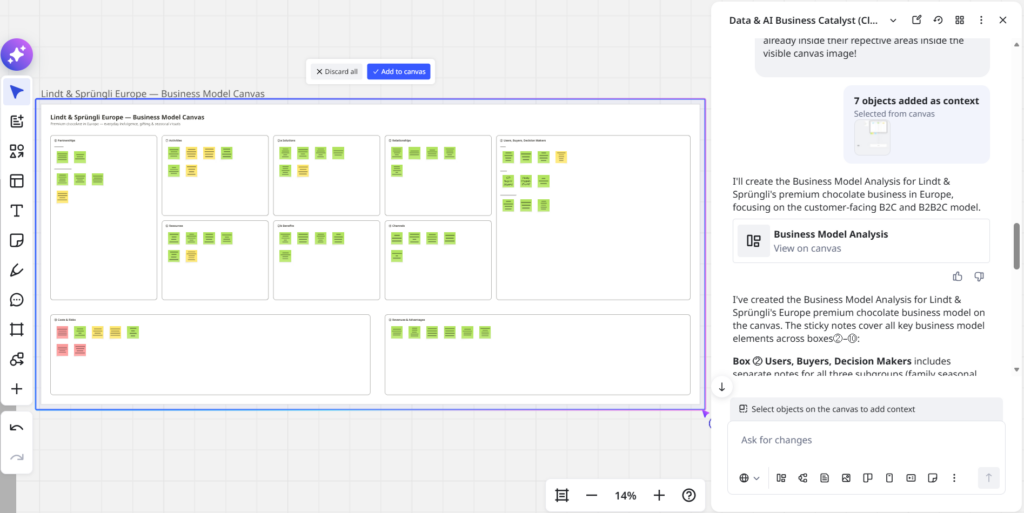
The output is not meant to be final. It gives the team something to review, move, cluster, edit, reject, and improve. AI creates momentum; the team keeps judgment.
4. Challenge what looks too easy
Once first ideas are on the canvas, Challenge helps make weak spots visible.
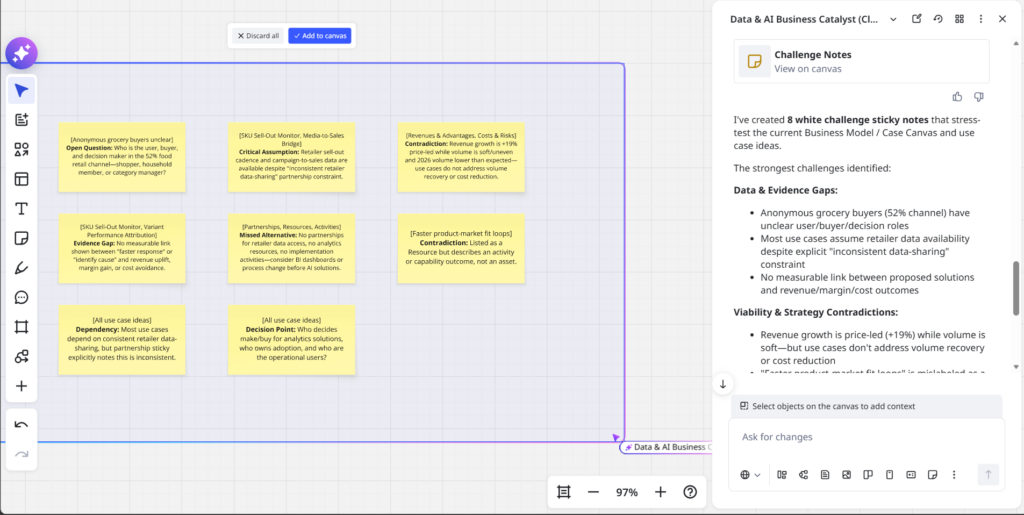
The Catalyst can surface open questions, risky assumptions, unclear ownership, missing data, or overlooked alternatives. That is where ideas become easier to test. The team does not just collect more options; it sees what needs to be clarified before moving on.
5. Check and choose the next focus
With Check, the Catalyst reviews whether the canvas is complete and consistent enough to continue. With Choose, it helps compare use cases and prepare the next focus.
The next step might be a user-centric use case design, a data landscape check, or a prioritization matrix. The team remains responsible for the decision, but it reaches the decision point faster.
How the Catalyst Helps You Accelerate Strategy Design
The Catalyst is not only useful because it knows one canvas. It is not only useful because it know several canvases. Many AI assistants know them. No, the Catalyst is helping you accelerate your workflow by integrating it all inside the Miro board: Your companies specific context together with the Data & AI Business Design method. And your context that builds up live during the workshop, while you make decisions or work on the board.
Our Data & AI Business Design method helps you to connect business goals, user needs, data capabilities, risks, benefits, and implementation paths. The Catalyst uses this method context to keep the workshop moving from raw input to structured canvas work, and a visuall, tangible clear roadmap.
That means less blank-canvas guessing and fewer disconnected AI outputs. Teams can see what is already there, what is still unclear, and what needs to move forward.
Explore the Data & AI Business Catalyst template on Miroverse.
Join the next Lunch & Learn
In our next Lunch & Learn on June 25 at 18:00 Berlin time, we will show the Data & AI Business Catalyst in action on Miro.
We will walk through the same flow: from a prepared briefing to the Business Model / Case Canvas, from AI Action Buttons to sticky notes, from assumptions to prioritization, and from workshop context to the next use case focus.
Join us if you want to see how Miro Sidekicks can support collaborative Data & AI Business Design — not as a replacement for the team, but as a catalyst for better workshop decisions.

